

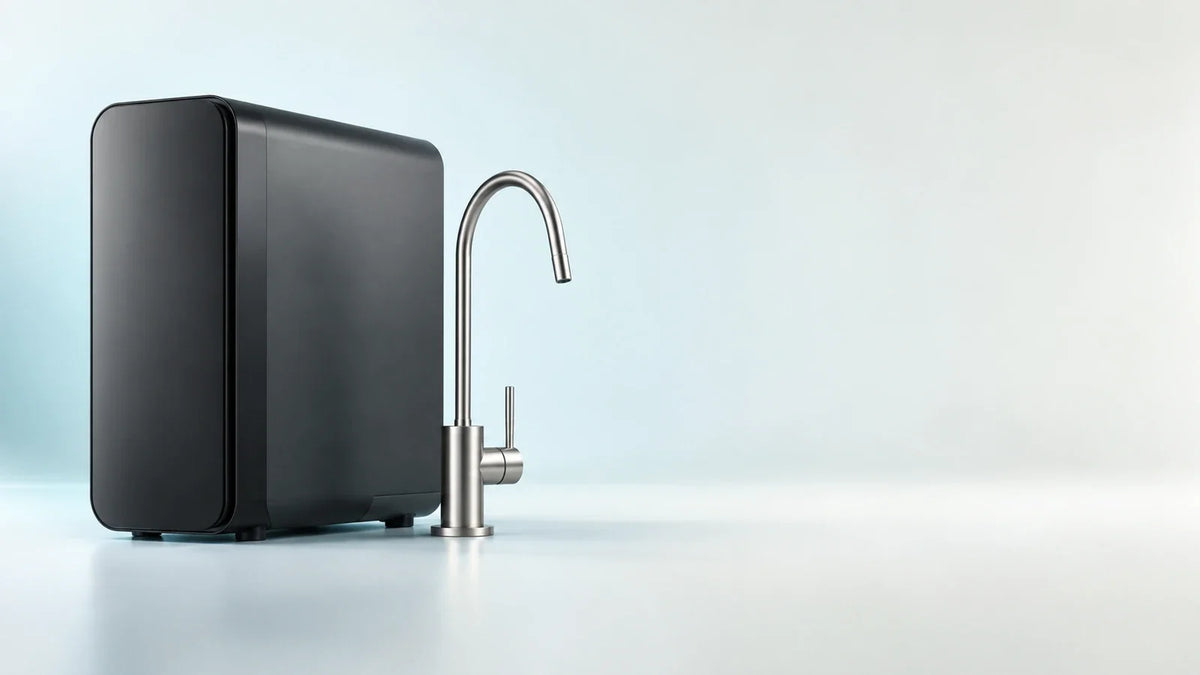
On Viomi's smart RO systems, the TDS readout and filter-life indicators are produced by the purifier itself: the main unit under the sink measures and tracks them, shows filter status on its own front-panel lights, and, on the Viomi M1, Viomi V6 PRO, and Viomi V8 PRO, sends the readings to the countertop faucet over a dedicated signal cable. The phone app is a second window onto that same data, adding usage reports, filter tracking, and in-app replacement notifications. On the Viomi V6 PRO and Viomi V8 PRO, Wi-Fi ships switched off, and the faucet shows output TDS from the very first flush.
Below is how that split works, what each Viomi model shows at the sink versus in the app, how to read the Wi-Fi light, and how to reconnect when you want the app.
Where Each Reading Actually Comes From
A smart RO purifier has three layers, and it helps to know which one is doing the work.
- The main unit under the sink. This is where water is filtered, where TDS is measured, and where filter life is tracked. It also has its own indicator lights and buttons. TDS (total dissolved solids) is a combined reading of the minerals and salts dissolved in water. It's a handy everyday gauge of your water, while reduction of specific contaminants is established by lab testing of each model.
- The faucet on the countertop. On the Viomi M1, Viomi V6 PRO, and Viomi V8 PRO, the faucet connects to the main unit through electric signal wires during installation. The Viomi M1 user manual and the Viomi V6 PRO / Viomi V8 PRO user manual both include a step where you join the signal wires from the main unit to the faucet and tighten the connector. The faucet display is fed by that cable.
- The phone app. The purifier joins your home Wi-Fi, and the Viomi App pulls the same TDS and filter data onto your phone, keeps a usage report, and sends in-app replacement notifications.
Here is the same split, model by model:
| Model | At the faucet | On the main unit's panel | In the Viomi App |
|---|---|---|---|
| Viomi M1 | Purified and tap-water TDS, filter life (%), PCB/RO lights | PCB/RO filter lights | TDS, inlet temperature, usage, filter %, days left, notifications |
| Viomi V8 PRO / Viomi V6 PRO | Purified TDS, RO/PCB filter-life indicators | PCB/RO filter lights (orange 10 to 15 days ahead) | TDS before and after filtration, daily usage, filter tracking, notifications |
| Viomi B6W | Standard faucet | PPC/RO filter lights | Purified and inlet TDS, usage, filter %, days left, reminders |
| Viomi V8 / Viomi V6 | LED ring: blue normal, orange time to replace | PCB/RO filter lights | App-free setup; reminders on the faucet ring and panel |
If a TDS number at the faucet is what you want, the Viomi M1, Viomi V6 PRO, and Viomi V8 PRO put it right where you pour.
A quick glossary for the labels you'll see: PCB and PPC are composite pre-filter cartridges (PPC on the Viomi B6W, PCB on the other models), and RO is the reverse osmosis membrane cartridge.
What You Can Read at the Sink
The TDS readout
On the Viomi V8 PRO and Viomi V6 PRO, the LCD smart faucet displays real-time purified-water TDS and filter life at a glance, while the app provides deeper insights like consumption patterns and system performance. Glance-level information sits on the faucet; the deeper analysis sits in the app.
The Viomi M1 goes a step further. Its touchscreen faucet shows two TDS numbers, one for purified water and one for your incoming tap water, along with a pH light bar and three preset volumes (10 oz, 40 oz, and 700 oz).

The Viomi V6 PRO and Viomi V8 PRO faucet starts reporting from day one. During the first-use flush, it displays rinse progress from 1 to 100 along with the TDS value of the water coming out. Wi-Fi on these units is switched off at the factory and set up manually whenever you choose.
Filter-life readouts and replacement lights
Every model reports filter status on the main unit's panel, and the faucet adds a second readout wherever the model has a display or LED ring.
- Viomi M1: The faucet's LED screen shows the remaining balance of each filter as a percentage. When a filter is close to the end of its life, the "PCB" or "RO" indicator flashes orange; once it reaches the end of its service life, the indicator stays solid orange. The main unit's control panel has matching PCB and RO lights.
- Viomi V6 PRO and Viomi V8 PRO: The faucet display carries RO and PCB filter-life indicators, and the control panel on the main unit alerts you with orange lights 10 to 15 days before a change is due. Flashing orange means a cartridge is nearing the end of its service life; solid orange means it has reached it.
- Viomi B6W: The PPC and RO lights on the main unit's panel flash orange as a filter nears the end of its life and turn solid orange when it reaches the end of its service life.
- Viomi V6 and Viomi V8: These models signal through the brushed-nickel faucet's LED ring, which glows blue in normal use and orange when it's time to replace a filter, plus the control panel on the main unit.
All of these signals are generated by the purifier and shown on the unit or its faucet, so you read them in the kitchen rather than on the phone.
Filter reminders run on a set schedule
Viomi purifiers count filter life from the date of installation, so replacements land on a predictable schedule, and the countdown starts fresh each time you install and reset a new cartridge.
What the App Adds on Top
The Viomi App puts the purifier's data on your phone. On the Viomi V6 PRO and Viomi V8 PRO, it offers four functions:
- Water Quality: TDS before and after filtration.
- Usage Report: daily water production.
- Filter Lifespan Tracking: remaining life and current usage status of each filter.
- Replacement Reminder: "timely in-app notifications when a filter has reached the end of its service life."
The Viomi M1 app view adds inlet water temperature and a 30-day water usage total, and the Viomi M1 manual notes that the app shows the number of days left on each filter, not just a percentage.
These are the features that let you check on the purifier from your phone instead of the faucet. They run over the purifier's Wi-Fi connection, and pairing takes a few button presses (steps below).

Running Without the App for the Long Term
The routine care steps in Viomi's manuals all happen at the purifier itself:
- Reading status: TDS and filter life on the faucet (Viomi M1, Viomi V6 PRO, Viomi V8 PRO), and filter lights on the main unit for every model.
- Getting reminders: the orange flashing and solid orange filter lights on the panel, plus the faucet display or faucet ring where the model has one.
- Flushing new filters: started from the faucet, following the flushing steps in the manual.
- Resetting the filter counter: done with the reset button on the main unit for every model; on the Viomi M1, Viomi V6 PRO, and Viomi V8 PRO it's Select plus a 3-second hold on Reset (details below).
The Viomi V6 PRO, Viomi V8 PRO, and Viomi B6W leave the factory with Wi-Fi switched off, and network pairing is a separate, manual step. On the Viomi M1, the three-round first flush is run from the faucet's touch icons. The app is an add-on you can turn on whenever you want reports and phone notifications.
Reading the Wi-Fi Indicator
On the Viomi M1, Viomi V6 PRO, and Viomi V8 PRO, both the faucet and the main unit's panel carry a Wi-Fi indicator; on the Viomi B6W it sits on the main unit's panel. Its behavior tells you the state of the network connection.
| Wi-Fi light | Meaning | What to do |
|---|---|---|
| Solid white (Viomi V6 PRO, Viomi V8 PRO) | Connected | Nothing |
| Rapid orange flashing (Viomi M1, Viomi V6 PRO, Viomi V8 PRO, Viomi B6W) | Not connected, or waiting for a connection | Improve signal strength or set up the connection again |
| Rapid blue flashing (Viomi M1, Viomi B6W) | Connection lost or reconnecting | Improve signal strength or set up the connection again |
| Off (Viomi M1, Viomi V6 PRO, Viomi V8 PRO, Viomi B6W) | Not connected to Wi-Fi within 30 minutes | If you use the app, start network setup with the button steps below |
The Wi-Fi light reports on the network connection, separately from the filter lights, and a short button routine brings the purifier back online. For a general primer, see the reboot vs. reset guide for smart modules.
How to Reconnect a Viomi Purifier
If you replace your router (new equipment, a new network name, or a new password), re-pair the purifier with the steps below for each app-connected model.
Viomi V6 PRO and Viomi V8 PRO
- Press and hold Select + Reset together for 3 seconds to start network setup.
- Add or re-pair the purifier in the Viomi App. Viomi recommends a 2.4 GHz Wi-Fi network.
- A three-beep tone and a solid white Wi-Fi light confirm a successful connection.
Viomi M1
- Press and hold Select and Reset together for 3 seconds.
- The Wi-Fi light starts flashing orange; a beep confirms the reset.
- Reconnect through the Viomi App. The Viomi M1 connects to 2.4 GHz Wi-Fi networks.
Viomi B6W
- Wi-Fi is off from the factory. Press and hold the selection key for 5 seconds to turn it on.
- To reset a dropped connection, press and hold Select and Reset together for 3 seconds, wait for the beep, then reconnect in the app.
If you plan to use the app, Viomi recommends connecting right after installation, so pair it the same day you plug the purifier in.

Habits That Keep Filter Reminders Accurate
- Reset the counter after every filter change. On the Viomi M1, Viomi V6 PRO, and Viomi V8 PRO, press Select to choose the PCB or RO indicator, then hold Reset for 3 seconds until you hear the confirmation sound. The manuals note that filter life then shows 100% "in both the app and on the faucet indicator," so one reset on the unit updates both.
- Flush new filters. After a replacement, run the flushing routine from the manual. On the Viomi V6 PRO and Viomi V8 PRO, the manual describes a 1 to 100 rinse-progress display and the TDS of the output water for this step.
- Know your normal TDS range. Glance at the faucet number for the first few weeks so you know what your usual reading looks like. The complete guide to TDS covers what typical numbers mean.
Frequently Asked Questions
Will my faucet still show TDS if my router goes down?
On the Viomi M1, Viomi V6 PRO, and Viomi V8 PRO, the TDS reading travels from the main unit to the faucet over a signal wire, not over your network. On the Viomi B6W, TDS readings are viewed in the app, while its panel lights handle filter reminders.
How will I know a filter needs replacing if I don't use the app?
Watch the control panel and faucet. On the Viomi M1, Viomi V6 PRO, Viomi V8 PRO, and Viomi B6W, the filter lights (PPC/RO on the Viomi B6W, PCB/RO on the others) flash orange as a filter approaches the end of its service life and stay solid orange once it gets there; on the Viomi V6 PRO and Viomi V8 PRO, that flashing starts 10 to 15 days ahead. On the Viomi V6 and Viomi V8, the control panel flashes orange 10 to 15 days in advance and the faucet ring turns orange when it's time to replace a filter; when the RO membrane expires, both the panel and the ring glow solid orange.
What does the Viomi App do that the faucet doesn't?
It brings the data to your phone. On the Viomi V6 PRO and Viomi V8 PRO, that means TDS before and after filtration, daily water-production reports, filter-life tracking, and an in-app notification when a filter reaches the end of its service life. The Viomi M1 app shows purified and inlet TDS, inlet temperature, a 30-day water-usage total, filter percentages, and days remaining, with an app notification when a filter expires. The Viomi B6W app covers purified and inlet TDS, water usage, filter percentages and days remaining, and filter replacement reminders.
Which Viomi models offer a setup without an app?
The Viomi V6 and Viomi V8 are designed around on-unit signals. Their LED faucet ring glows blue in normal use and orange when a filter is due, and the control panel lights back it up. There's no network to set up or maintain.
My purifier's Wi-Fi light is off. Is something wrong with the filtration?
In Viomi's indicator tables, an unlit Wi-Fi light means the purifier hasn't connected to Wi-Fi within 30 minutes. It's a network status light, separate from the filter lights. If you use the app, then on the Viomi M1, Viomi V6 PRO, and Viomi V8 PRO, hold Select + Reset for 3 seconds to start setup and pair it in the app. On a new Viomi B6W, turn Wi-Fi on first by holding the selection key for 5 seconds.
Which Setup Fits the Way You Use Your Kitchen
- You want numbers at the sink and in your pocket. The Viomi M1 shows purified and tap-water TDS plus filter percentages on its touchscreen faucet, and adds inlet temperature, 30-day usage totals, and days-left countdowns in the app. It also adds remineralization and a 1000 GPD membrane.
- You want a clear TDS number at the faucet and app tracking as a bonus. The Viomi V8 PRO (800 GPD) and Viomi V6 PRO (600 GPD) pair an LCD smart faucet showing purified TDS and filter-life indicators with panel lights that warn 10 to 15 days ahead, plus full app tracking.
- You prefer a classic faucet and like checking data on your phone. The Viomi B6W is a 600 GPD tankless system with a standard faucet, filter lights on the panel, and TDS, filter life, and usage in the Viomi App.
- You prefer straightforward filter reminders without app setup. On the Viomi V6 and Viomi V8, a color-changing faucet ring and panel lights handle filter reminders.
Whichever you choose, the core reminders are built into the purifier: its panel lights on every model, plus the faucet display or faucet ring where the model has one. The app adds reports and notifications on your phone.
Share:
Fresh TDS Reading or Cached Value? How to Tell on a Smart Faucet
First-Glass vs. Steady-Flow TDS: What to Log for a Tankless RO System