

When a reverse osmosis (RO) system sits unused, it does not simply pause and wait patiently for you. Water stagnates, bacteria can multiply on wet filter media, and the RO membrane that normally protects your household may have been sitting in low-flow, low-oxygen conditions for weeks or months. As a Smart Hydration Specialist and water wellness advocate, I see reactivation not as flipping a switch, but as carefully bringing a powerful filtration system back to safe, reliable service.
Drawing on guidance from technical sources such as University of Nebraska–Lincoln Extension, water-treatment manufacturers, and field experts like Crystal Quest, Culligan, Fresh Water Systems, and Rosie Romero’s home-improvement advice, this article walks you through what really needs to happen when you restart an inactive RO system.
The goal is simple: restore safe, great-tasting water without guessing, cutting corners, or wasting expensive components.
What Happens Inside an Idle RO System
To reactivate an RO system wisely, it helps to understand what is going on whenever the unit sits idle.
Reverse osmosis is a pressure-driven process that forces water through a semi‑permeable membrane. According to University of Nebraska–Lincoln Extension, typical point‑of‑use RO units under a sink or on a countertop produce roughly 10 to 35 gallons of treated water per day and reject a broad spectrum of contaminants, including many heavy metals, pesticides, and dissolved salts. Research summarized in a technical paper on RO performance notes that well-designed systems often remove around 97 to 98 percent of dissolved ions and roughly 99 percent of many other contaminants, which is why RO is used worldwide for high-purity drinking water.
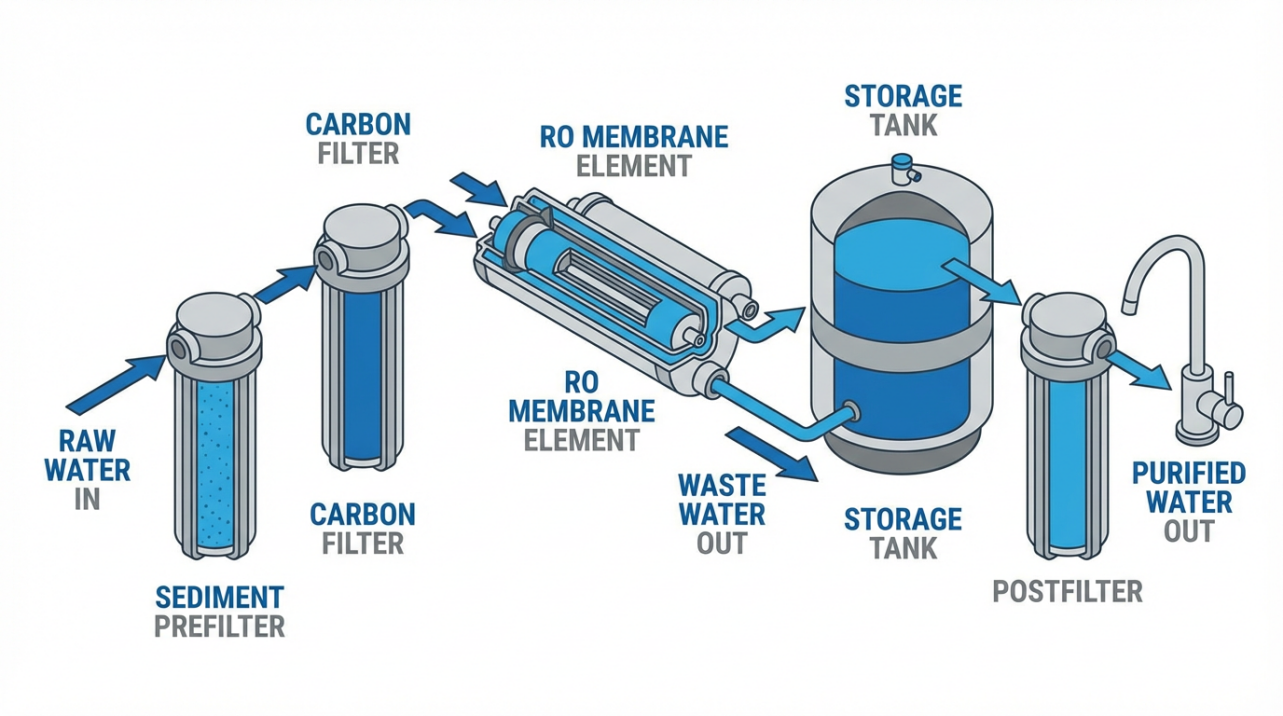
To protect the membrane, household systems use prefilters (sediment and carbon) and postfilters, often combined with a storage tank. Maintenance guides from Crystal Quest, Affordable Water, and Fresh Water Systems all stress that these filters accumulate whatever they remove: sediment, organic material, and chlorine byproducts. During normal daily use, continuous flow and frequent tank turnover help keep conditions stable.
When the system sits unused, several changes occur. Fresh Water Systems explains that water filtration systems are designed for regular use; extended shutdown allows bacteria to grow on wet membranes and filter media. Bluevua’s countertop maintenance guide similarly warns that poorly maintained storage tanks can become a breeding ground for bacteria. In stagnant water, nutrients and biofilms build up, while disinfectant residuals (if any) dissipate. That means an inactive system can quietly transform from a protective barrier into a warm, nutrient-rich environment that microorganisms love.
At the same time, the RO membrane itself may be at risk. A forum discussion on an RO filter not used for two months highlights that if a membrane is allowed to dry out, its rejection rate can drop significantly, and replacement is often recommended. Even if it stayed wet, extended stagnation can foul the membrane, reducing flow and contaminant removal.
A simple example illustrates why flushing and sanitizing matter. Nebraska Extension notes that many household RO systems operate at about 20 to 30 percent recovery, meaning that if 100 gallons of tap water feed the system in a day, only about 20 to 30 gallons become treated water while the remainder exits as concentrate. Now imagine that production rate dropping sharply because the membrane has become fouled after months of sitting; not only will you wait longer for a glass of water, but the membrane may no longer provide the contaminant reduction you originally paid for.
In short, an idle RO system is never just “paused.” Internal surfaces may now host microbial growth, filters are older whether you used them or not, and the membrane’s performance is unverified.
First Decision: DIY Reactivation or Call a Professional?
Before touching valves or ordering filters, pause and decide whether reactivation should be a do‑it‑yourself project or a professional job. That decision depends mainly on how long the system has been idle, how complex the installation is, and how comfortable you are working with pressurized plumbing.
Consumer maintenance guides from Crystal Quest, Fresh Water Systems, Affordable Water, and Culligan strongly agree that routine tasks such as filter replacement on schedule, monthly leak checks, and annual sanitization are usually within reach for a careful homeowner. Most of these tasks involve shutting off the water, relieving pressure, swapping cartridges, and flushing the system, typically in less time than brewing a pot of coffee.
On the other hand, several sources emphasize that plumbing, tank issues, and long-term idle systems are different. Crystal Quest notes that leaks under the sink can be costly if they go unnoticed, and recommends professional help when troubleshooting ongoing low flow, persistent leaks, or complex repairs. Moore Mechanical and Affordable Water both suggest bringing in a qualified technician for more involved work such as stubborn low-pressure problems, complicated membrane replacement, or system upgrades.
An under-sink RO reactivation story published by an Arizona home improvement columnist, Rosie Romero, makes this distinction very concrete. A homeowner asked how to restart a kitchen RO system that had been shut off for about two years. Romero’s core advice was not to simply turn the system back on. Instead, he recommended hiring a qualified technician to reconnect the unit, thoroughly sanitize all parts (lines, storage tank, and components), and replace all filters and the RO membrane before using the water again. His reasoning is straightforward: after such a long shutdown, you want a professional to confirm that both plumbing integrity and water quality are restored, because the risk of microbial contamination and material degradation is simply too high.
A real-world cost example from a DoItYourself.com forum shows what is at stake financially. One homeowner broke down a service visit at about $320, roughly half materials and half labor, for a mix of sediment, carbon, lead-specific, and alkaline post-filters. For a confident homeowner, buying those filters directly could significantly reduce the bill. But if the system has been idle for many months or years, you are not just buying parts; you are buying expertise in sanitization, leak prevention, and performance verification.
As a rule of thumb grounded in these sources, short idle periods with no evident problems lend themselves to DIY reactivation with flushing and basic maintenance. Long idle periods measured in months or years, especially on under-sink systems, are safer and often more cost-effective to handle with a qualified water-treatment technician.
How Long Has Your RO System Been Inactive?
The length of inactivity shapes the entire reactivation strategy. Fresh Water Systems offers a practical framework specifically for shutdowns:
If your system has been unused for about a week or less, they recommend reconnecting, checking for leaks, flushing each outlet for at least several minutes, and fully draining the RO storage tank, then running the system long enough to refresh all stagnant water. For RO systems idle seven days or less, they describe a process of emptying the tank until the pump turns on and flushing through each outlet for about ten minutes, which purges most microbiological growth that might have appeared during that short downtime.
If your system has been idle for more than about a week, the same source strongly recommends replacing all filtration elements and sanitizing the system. At that point, the risk of significant bacterial growth in the filter media and tank is much higher, and the filters are treated as effectively spent regardless of their calendar age.
Extended inactivity measured in months or years is its own category. The two-year shutdown scenario described by Rosie Romero is a good example: the advice there is complete replacement of all filters and the membrane, thorough sanitization, and professional reconnection and leak checks. That approach aligns with the caution from the UK-based forum discussion, which notes that an RO membrane left unused for about two months and allowed to dry out may already be damaged enough to require replacement.
In other words, your next steps depend on whether you are reactivating a system that has napped for a few days, taken a several-week vacation, or effectively gone into hibernation.

Reactivating an RO System Idle for a Week or Less
When your RO system has been idle only briefly, reactivation is usually straightforward. The aim is to move any stagnant water out of the housings, lines, and storage tank, and to verify that the system still behaves like a healthy RO unit. Fresh Water Systems and Crystal Quest both describe short-flush routines that typically take just a few minutes.
Begin by inspecting the area around the system. Look under the sink or on the counter for any signs of leaks, corrosion, or damage. If the system was physically disconnected, reconnect according to the manufacturer’s instructions, making sure tubing is fully seated and not kinked. This visual check mirrors Crystal Quest’s monthly five-minute inspection, where they advise looking for leaks, listening for unusual running sounds, and confirming steady, non‑sputtering flow.
Next, restore the water supply to the RO system and, if applicable, plug in any power supplies or booster pumps. Open the RO faucet and let the water run. For whole-house or under-sink filters that have been unused for up to about seven days, Fresh Water Systems advises flushing each outlet port for at least five minutes. For a point-of-use RO system, they add that you should fully empty the storage tank until the pump or system starts refilling, then continue flushing for about ten minutes through each outlet. This routine displaces stagnant water and pushes fresh feed water through the membrane and postfilter.
Consider a simple example. Suppose your under-sink RO storage tank holds about three gallons. Nebraska Extension notes that household RO tanks commonly range from about two to five gallons. If you completely drain that three-gallon tank once and then let it refill and drain again, you have turned over roughly six gallons of water. That is enough to replace the entire contents of the tank twice, which is consistent with Fresh Water Systems’ recommendation to flush the entire system and tank multiple times after a shutdown.
While you flush, pay attention to taste, odor, and flow. Crystal Quest suggests tasting for chlorine or metallic flavors and watching for slow flow as early warning signs that filters or the membrane may be at the end of their useful life. If the water quickly tastes clean, the flow is steady, and there are no leaks, a short idle period followed by this flushing routine is often all that is needed to bring the system back into normal use.
If, however, the water still tastes off after a thorough flush, or the flow remains very slow, you have effectively discovered a maintenance problem during reactivation. In that case, it is wise to follow the more thorough extended-reactivation steps, including filter replacement and system sanitization, rather than assuming the system is safe just because it turned back on.
Reactivating an RO System Idle for Weeks or Months
Once your RO system has been idle for more than about a week, most expert guidance converges on a more robust process: replace the filters, sanitize the system, and then verify performance. This approach is recommended by Fresh Water Systems for post-shutdown reactivation and echoed in annual maintenance guidance from Crystal Quest, Affordable Water, Fresh Water Systems’ general RO maintenance tips, and Culligan.
The first step is planning to replace all prefilters and postfilters, and often the RO membrane as well. Many consumer guides suggest routine replacement intervals of about six to twelve months for sediment and carbon filters, and roughly two to four years for membranes under normal use. After several weeks or months of stagnation, you should treat these components as expired regardless of calendar age. Filters that have been sitting in low-flow, nutrient-rich conditions are simply not worth gambling with, especially when drinking water for your household is at stake.
With replacement parts on hand, shut off the water supply to the RO system and depressurize it by opening the RO faucet until flow stops. Fresh Water Systems and Affordable Water both emphasize this step before opening housings or disconnecting tubing. Once pressure is relieved, close the valve on the storage tank and disconnect power to any pumps.
Remove the existing prefilters and postfilters and, for extended inactivity, remove the membrane as well. For long idle periods, Fresh Water Systems’ shutdown guidance explicitly recommends discarding prefilters and membranes before sanitizing the system. Place the empty housings back on so that sanitizer can circulate through the system without being absorbed or neutralized by old filter media.
Now you are ready to sanitize. There are two main paths documented in the sources. Crystal Quest recommends sanitizing RO systems with a solution made from about one tablespoon of unscented bleach per gallon of water, allowing the solution to sit in the system for roughly an hour before flushing until the bleach odor is gone. Fresh Water Systems, on the other hand, highlights a non-chlorine sanitizer that is EPA‑ and NSF‑approved specifically for RO systems and water softeners. They describe adding a measured sanitizer (such as Sani‑System) into the prefilter housing, refilling the system so the sanitizer reaches all internal surfaces and the storage tank, holding it for at least the manufacturer’s recommended contact time (often about a minute or more), and then flushing the entire system and storage tank twice.
In either case, the idea is the same. You temporarily convert the RO plumbing into a disinfecting loop, allow the sanitizer to contact all wet surfaces, and then thoroughly flush away the disinfectant. For example, if your tank holds three gallons and you follow Fresh Water Systems’ advice to flush the full tank twice after sanitizing, you will push at least six gallons of water through the tank, enough to clear out both sanitizer and residual stagnant water before reintroducing new filters and a fresh membrane.
Once sanitization is complete and you have flushed the system according to the chosen method, install the new filters and membrane. Affordable Water and Fresh Water Systems both stress the importance of flushing new filters to remove manufacturing residues; often this means discarding the first full tank or two of water after installation. Culligan likewise recommends performing a full cleaning and sanitization whenever filters are changed and notes that a well-maintained RO system can last up to about fifteen years, while Crystal Quest estimates that consistent maintenance can extend life from about five to ten years up to roughly fifteen to twenty years. Reactivation after a long shutdown is an excellent moment to reset your system into that well-maintained category.
After the new components are in place, restore water and power, slowly open the tank valve, and let the system fill. Check for leaks at every connection. When the storage tank is full, open the RO faucet and drain the first tank completely. Repeat the fill-and-drain cycle at least one more time. Only then should you begin using the water for drinking and cooking.

If your system has been idle for many months or years, or if you are uncomfortable with any of these steps, this is the point where professional service makes sense. As Rosie Romero emphasizes for the two-year idle system, a qualified technician can ensure that filters and membranes are replaced correctly, the system is thoroughly sanitized, and all plumbing connections are safe. That peace of mind is particularly important when children, older adults, or immunocompromised family members depend on the water.
Reactivating After a Year or More: Treat It Like a New System
When an RO system has been shut down for a year or longer, especially if it was fully valved off, it is best to assume that every wetted component other than the hard plumbing may need replacement or professional evaluation. The two-year shutdown example discussed by Rosie Romero recommends complete replacement of all filters and the membrane, plus comprehensive sanitization by a qualified technician.
This conservative stance is supported indirectly by other sources. The UK discussion on an RO filter unused for two months notes that a dried-out membrane may already be damaged enough to warrant replacement, and that mold or biofilm is more likely to grow in housings, lines, and prefilters. Fresh Water Systems highlights that any filtration system idle for more than roughly a week should have filters replaced and undergo sanitization because of increased microbiological growth risk. Extending that logic to a year or more makes the case clear: you are not reviving a slightly stale system; you are effectively recommissioning a piece of water-treatment equipment that has been out of service.
In such cases, treat the reactivation like a new installation. Have a professional inspect feed water quality, verify that the RO unit is still appropriate for the contaminants present, replace all consumables, and perform a start-up that includes leak checks, tank pressure verification, and water-quality testing. When done correctly, you return not merely to adequate operation, but to the high rejection rates and long-term durability that RO systems are designed to deliver.
Countertop vs Under-Sink RO: Different Reactivation Strategies
Your reactivation plan should also reflect the type of RO system you own. Countertop units and under-sink installations treat water in the same fundamental way, but they behave very differently when idle.
A Wellesley College overview of countertop versus under-sink RO systems explains that countertop models are portable, sit on the counter, and usually connect directly to a faucet without permanent plumbing changes. They are popular for renters and frequent movers, and maintenance is generally simple and accessible. Under-sink systems, by contrast, are plumbed into the home’s water line, often include a pressurized storage tank, and deliver higher flow and capacity for larger households.
Bluevua’s countertop maintenance guide adds some nuanced differences. Many countertop systems use internal plastic tanks that can be hard to clean, but Bluevua designs its units with external borosilicate glass carafes that can be easily rinsed or placed in the dishwasher. Their systems also offer self-cleaning cycles that automatically flush internal piping and optional descaling kits tailored to hard-water areas.
These design choices change how you reactivate each style of system. A countertop RO with an external glass carafe is relatively easy to wake up after a short period of inactivity: you can simply empty and clean the carafe, run a cleaning cycle if available, and perform the same sort of flushing that Fresh Water Systems recommends for short shutdowns. Bluevua specifically advises emptying and cleaning both raw and storage water containers before extended periods of disuse and storing the system away from direct sunlight to prevent heat damage and degradation.
Under-sink systems are less forgiving. They rely on pressurized tanks, multiple under-sink connections, and hidden tubing. Crystal Quest points out that under-sink systems demand more technical engagement for upkeep, and leaks can cause costly damage inside cabinets if not caught early. Reactivating a long-idle under-sink system therefore combines the extended shutdown steps already described with careful inspection of every visible connection and, often, professional support for tank and plumbing checks.
Here is a high-level comparison of how idle periods affect each style of residential RO system.
Aspect |
Countertop RO |
Under-Sink RO |
Typical installation |
Sits on counter, faucet connection, no permanent plumbing |
Plumbed into cold-water line under sink, dedicated RO faucet |
Reactivation after short idle |
Clean external carafe, run self-clean or flush cycles, easy user DIY |
Flush system and tank, inspect under-sink area, more hidden risk |
Reactivation after long idle |
Replace filters, sanitize unit, often still user-manageable |
Replace filters and membrane, sanitize system, professional often recommended |
Leak risk |
Lower; no pressurized under-sink plumbing, external carafe |
Higher; pressurized lines and storage tank inside cabinet |
Best suited for |
Renters, small kitchens, frequent movers |
Homeowners wanting high capacity and concealed installation |
Whether countertop or under-sink, the core principles are the same: remove stagnant water, disinfect internal surfaces, install fresh filters and a healthy membrane, and verify performance before drinking.

The main difference lies in how easy it is to see and manage every part of the system during reactivation.
How to Confirm Your Reactivated RO System Is Really Safe
Once you have flushed, sanitized, and installed new filters, how do you know the system is truly back to its protective best rather than simply working “well enough”? Several sources outline practical checks that do not require lab equipment.
Crystal Quest recommends a simple monthly routine that is especially valuable after reactivation. Look for any leaks under the sink or around the unit, listen for strange or constant running noises, confirm that flow from the RO faucet is steady and not sputtering, and taste the water carefully for any off flavors such as chlorine or metallic notes. Any of these signs can indicate clogged filters, a failing membrane, or a malfunctioning shut-off valve.
Culligan emphasizes that changes in flow rate, lingering tastes, or odors are warning signs that filters or parts may need replacement or that the system requires maintenance. They add that when properly maintained, RO systems can last up to about fifteen years, which underscores why catching early performance changes matters.
Both Crystal Quest and Fresh Water Systems highlight the value of a simple total dissolved solids (TDS) meter. Crystal Quest notes that a healthy RO system typically produces water with TDS about ninety percent lower than the feed tap water. Fresh Water Systems explains that tracking membrane rejection and replacing the membrane when TDS begins to rise helps maintain long-term water quality. For instance, if your tap water measures around 300 parts per million dissolved solids and your RO water initially averages about 30 parts per million, that represents roughly ninety percent reduction. If, after reactivation and some weeks of use, the RO reading drifts upward to 80 or 100 while tap water stays the same, that trend is a strong signal that the membrane or prefilters need attention.
Affordable Water adds a couple of practical checks that are especially useful after a deep reactivation. They recommend checking storage tank air pressure every six to twelve months by draining the tank and using a pressure gauge, and inspecting all tubing and fittings for cracks or loose connections. They also emphasize annual sanitization of the tank and tubing to prevent bacterial buildup, an approach entirely in line with Fresh Water Systems’ yearly sanitization recommendation.
Bringing all of this together, a smart post-reactivation routine looks like this in practice. After your final flush, drink a small sample and pay attention to taste and smell. Observe the flow over the next few days; it should be consistent whenever the tank has had time to refill. Use a TDS meter to establish a new baseline for your reactivated system, noting both tap and RO TDS values in a small notebook or on your cell phone. Over the following months, repeat these measurements and watch for trends rather than obsessing over tiny day-to-day fluctuations. Combined with simple leak checks and annual sanitization, these steps transform reactivation from a one-time event into the starting point of a healthier maintenance habit.
Preventing Future Reactivation Headaches
The easiest way to reactivate an RO system is to avoid having a “problem shutdown” in the first place. Several of the sources provide guidance on how to handle planned breaks and how to keep systems in a healthy state year-round.
Fresh Water Systems suggests that before a planned extended shutdown, you should run water through filters for a few minutes every few days if possible, and turn off the water supply to the RO system to minimize stagnation. If the system will be unused for more than roughly a week, plan on replacing filters and sanitizing before returning to regular use. For RO units that are normally low-use, they recommend fully draining the storage tank at least every couple of weeks so the system operates at proper pressure and water in the tank stays fresh.
Bluevua’s guidance for countertop systems adds useful details for portable units. Empty and clean both raw and storage tanks before long periods of disuse and store the system out of direct sunlight to protect its components. Their use of external glass carafes simplifies this routine; the carafe can be rinsed or placed in a dishwasher, addressing one of the main bacterial growth risks in many countertop designs.
General RO maintenance advice from Crystal Quest, Moore Mechanical, Affordable Water, Culligan, and Fresh Water Systems converges on a few key patterns. Replace sediment and carbon prefilters about every six to twelve months, depending on usage and local water quality. Replace the RO membrane roughly every two to four years under typical conditions, sooner if TDS readings climb or flow drops significantly. Sanitize the system and storage tank at least once a year, using either a measured bleach solution or an RO-specific sanitizer, and always flush thoroughly afterward. Monitor taste, odor, clarity, and flow, and investigate changes early.
There is a clear payoff for this attention. Crystal Quest points out that consistent maintenance can extend RO system life from roughly five to ten years up to about fifteen to twenty years, and Culligan similarly notes that well-maintained systems can last up to fifteen years. That is not just a technical win; it is also a financial one. By spending a few minutes each month on inspections and budgeting for periodic filters and sanitization, you greatly reduce the chances of facing a stressful, uncertain reactivation after years of neglect.
Short FAQ on Reactivating Inactive RO Systems
Q: How long can my RO system sit unused before I need to replace filters rather than just flushing it? A: Fresh Water Systems draws the line at about a week. If your system has been idle for seven days or less, a thorough flush and complete tank drain is often enough. Once you pass roughly a week of disuse, they recommend replacing all filtration elements and sanitizing the system because of increased microbiological growth on the wet media.
Q: After a long shutdown, do I always need to replace the RO membrane, or can I test it first? A: Several sources suggest that membranes can last for years with proper maintenance, but they are sensitive to drying and stagnation. A discussion of an RO membrane left unused for two months notes that dried membranes may be damaged and require replacement. If your system has only been idle for a few weeks and the membrane stayed wet, you may choose to test its performance using a TDS meter, watching for about ninety percent reduction relative to tap water as Crystal Quest describes. However, after many months or years of inactivity, especially if the system was not stored according to manufacturer guidance, replacing the membrane along with filters is the safer path and is explicitly recommended in the two-year shutdown example discussed by Rosie Romero.
Q: Is it worth calling a professional if I already know how to change filters? A: For short idle periods and routine maintenance, DIY care is both practical and encouraged by many manufacturers. But when you are reactivating a system after extended inactivity, dealing with persistent low pressure or leaks, or working with a complex under-sink installation, professional help can prevent water damage, ensure proper sanitization, and verify water quality. The Arizona case of a two-year idle RO system illustrates how a professional technician can combine filter and membrane replacement with thorough sanitization and plumbing checks, turning a potential health risk into a reliable hydration asset again.
Reactivating an inactive RO water system is really about respecting the biology and physics inside your filtration equipment. RO technology is capable of extraordinary contaminant removal, but only when its filters, membranes, and storage tank are kept clean, flushed, and refreshed. With a thoughtful reactivation plan grounded in science-backed maintenance practices and, when needed, professional support, you can bring even a long-silent RO system back to delivering clear, great-tasting water that supports your daily hydration routine with confidence.
References
- https://covidstatus.dps.illinois.edu/reviews-ro
- https://www.academia.edu/37803103/IMPACT_OF_REVERSE_OSMOSIS_ON_PURIFICATION_OF_WATER
- https://energy.stanford.edu/news/new-model-could-break-through-inefficiencies-common-water-treatment-systems
- https://blogs.wellesley.edu/news/is-a-countertop-reverse-osmosis-system-better-than-an-under-sink-model/
- https://www.cpp.edu/~engineering/coe-magazine/19-20-coemag/pure-water.shtml
- https://repository.arizona.edu/bitstream/handle/10150/156939/az9419-1994.pdf?sequence=1&isAllowed=y
- https://myweb.sabanciuniv.edu/pouyazoghipour/2024/10/09/what-are-the-benefits-of-using-a-countertop-reverse-osmosis-system/
- https://www.umass.edu/agriculture-food-environment/sites/ag.umass.edu/files/fact-sheets/pdf/reverseosmosis.pdf
- https://extensionpublications.unl.edu/assets/html/g1490/build/g1490.htm
- https://www.ukaps.org/forum/threads/ro-filter-not-used-in-2-months.73537/

Share:
Understanding Valve Failure Indicators in Smart Home Water Systems
Three Early Signs of Wastewater Pipe Blockage to Watch For